> For the complete documentation index, see [llms.txt](https://help.arkance-systems.com/document-navigator/llms.txt). Markdown versions of documentation pages are available by appending `.md` to page URLs; this page is available as [Markdown](https://help.arkance-systems.com/document-navigator/licence/pro-spravce/portal-pro-spravu/objednavky.md).
# Objednávky
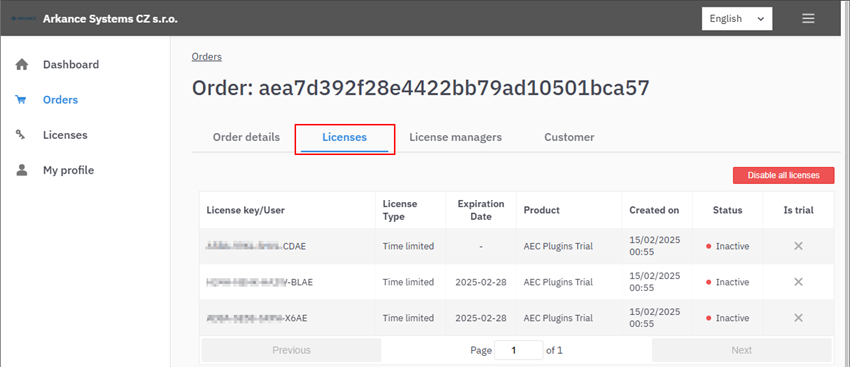
Po otevření detailu objednávky vidí správce na záložce Licenses všechny licence obsažené v objednávce. U každé licence je uveden licenční klíč, typ licence, datum expirace, datum vytvoření, status aktivní / neaktivní a označení trial licencí. Kliknutím na konkrétní licenci se otevře nová stránka s detailem licence.
{% hint style="info" %}
**Status 🔴 Inactive značí, že daný klíč není použitý (aktivní) na žádném zařízení. Jedná se však o platný klíč.**
**Po aktivaci klíče na alespoň jednom zařízení se status změní na 🟢 Active.**
{% endhint %}
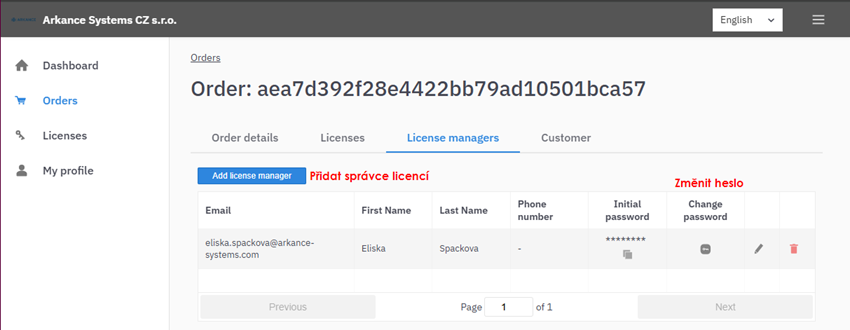
Na záložce License managers lze k objednávce přidat další správce. Pro přidání je nutné uvést emailovou adresu, jméno a příjmení nového správce, telefonní číslo (volitelně) a nastavit heslo. Již přiřazené správce lze editovat nebo odebrat.