> For the complete documentation index, see [llms.txt](https://help.arkance-systems.com/civil-tools/llms.txt). Markdown versions of documentation pages are available by appending `.md` to page URLs; this page is available as [Markdown](https://help.arkance-systems.com/civil-tools/prirucka/povrch/odhumusovani.md).

# Skrývka povrchu

<img src="/files/D67F8Ix2ccAAwKwe7YsI" alt="" data-size="line"> Nástroj pro generování odhumusovaného povrchu na základě křivkami zadaných polygonů a hloubek jednotlivých skrývek ornice, které vycházejí z pedologického průzkumu. Uživatel jednoduše vybere hladinu s hraničními křivkami a texty, výsledný styl a funkce následně vygeneruje odhumusovaný povrch o různých hloubkách skrývky. Lze vybrat také různé jednotky pro hloubku odhumusování.

{% embed url="<https://youtu.be/PNAbczhGomE>" %}

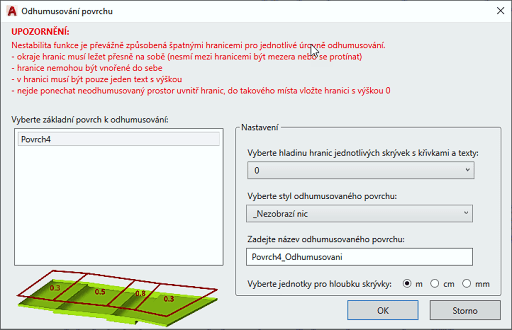
<figure><img src="/files/KRs1OJjgaQYQCXaZtGEz" alt=""><figcaption><p>Dialog nástroje Odhumusování povrchu</p></figcaption></figure>

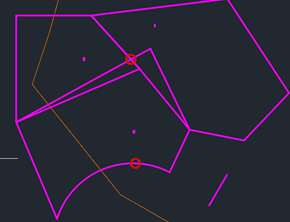
Během běhu funkce se kontroluje správnost hranic regionů odhumusování a vizuálně jsou zobrazeny případné chyby – např. označení křížení, oblouků:

<figure><img src="/files/2Cred2Z1vDMdpfXefATT" alt=""><figcaption><p>Nástroj Odhumusování - zobrazení chyb </p></figcaption></figure>


---

# Agent Instructions
This documentation is published with GitBook. GitBook is the documentation platform designed so that both humans and AI agents can read, navigate, and reason over technical content effectively. Learn more at gitbook.com.

## Querying This Documentation
If you need additional information that is not directly available in this page, you can query the documentation dynamically by asking a question.

Perform an HTTP GET request on the current page URL with the `ask` query parameter:

```
GET https://help.arkance-systems.com/civil-tools/prirucka/povrch/odhumusovani.md?ask=<question>
```

The question should be specific, self-contained, and written in natural language.
The response will contain a direct answer to the question and relevant excerpts and sources from the documentation.

Use this mechanism when the answer is not explicitly present in the current page, you need clarification or additional context, or you want to retrieve related documentation sections.